
Top 10 Quality Monitoring Templates for Customer Support Teams [2026 Guide]
Why Quality Monitoring Templates Matter
Before diving into the templates, let's understand why standardized quality criteria are crucial:
The Problem with Manual Quality Monitoring
Most support teams evaluate only 2-3% of customer interactions due to time constraints. This creates:
- Blind spots: 97-98% of conversations are never reviewed
- Bias: Managers cherry-pick calls, missing systematic issues
- Inconsistency: Different evaluators use different standards
- Slow feedback: Agents receive coaching weeks after interactions
The Solution: Standardized Templates + AI
With quality monitoring templates powered by AI:
- ✅ 100% coverage: Every interaction is evaluated automatically
- ✅ Consistency: Same criteria applied to all agents
- ✅ Speed: Real-time feedback instead of delayed reviews
- ✅ Objectivity: Data-driven insights remove subjective bias
How to Use These Templates
Each template below includes:
- Criteria: Specific elements to evaluate
- Scoring Type: Yes/No, 0-10 scale, or Labels
- Point Value: Weight of each criterion (total = 100 pts)
- AI Prompt: Question for automated analysis
Scoring Types Explained
- Yes/No (Binary): For clear-cut criteria (present or absent)
- 0-10 (Scale): For nuanced evaluation requiring judgment
- Labels (Categories): For classification into quality levels
Pro Tip: Start with 5-6 criteria per template. You can always add more as your program matures.
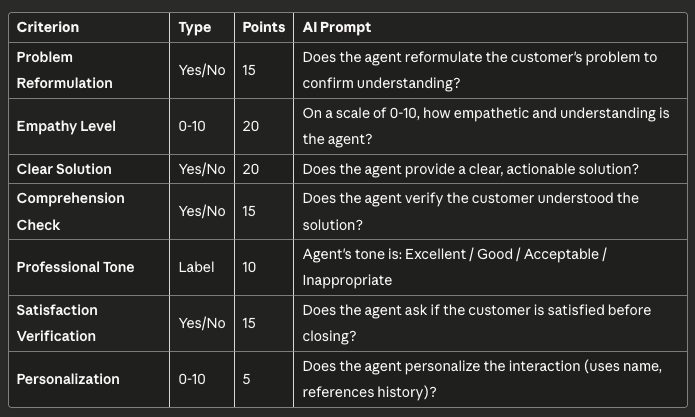
Template #1: General Customer Support
Best for: B2C and B2B support teams handling general inquiries
Total Score: /100 points
Why This Template Works
This template covers the essential elements of quality support while remaining simple enough for daily use. The 20-point weight on "Clear Solution" reflects its critical importance to customer satisfaction.
Real Results: Companies using this template see an average +18% improvement in CSAT within 3 months by identifying and coaching on specific gaps.
Implementation Tips
- Start with "Problem Reformulation" and "Clear Solution" (35 points combined)
- Add empathy criteria after agents master the basics
- Adjust weights based on your brand values (e.g., luxury brands weight "Personalization" higher)
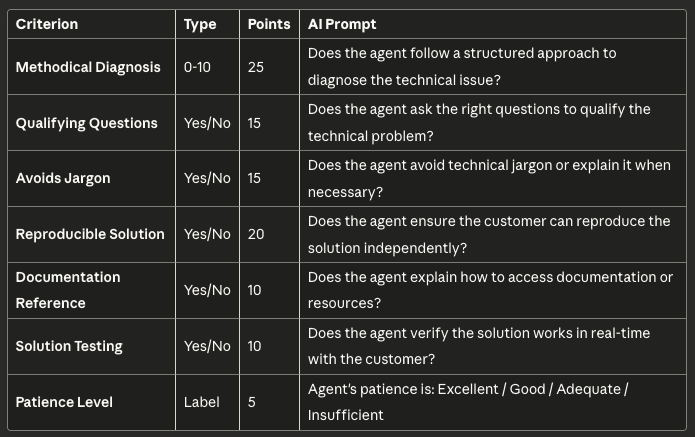
Template #2: Technical Support
Best for: IT support, software helpdesk, technical troubleshooting
Total Score: /100 points
Technical Support Challenges
Technical support requires balancing expertise with accessibility. The best agents can explain complex solutions in simple terms while maintaining patience with non-technical users.
Common Mistake: Agents rush to solutions without proper diagnosis, leading to repeat contacts and frustration.
Key Success Metrics
- First Contact Resolution (FCR): Should improve by 15-20% with proper diagnosis
- Repeat Contact Rate: Target <10% for technical issues
- Average Handle Time (AHT): May increase slightly but with higher resolution quality
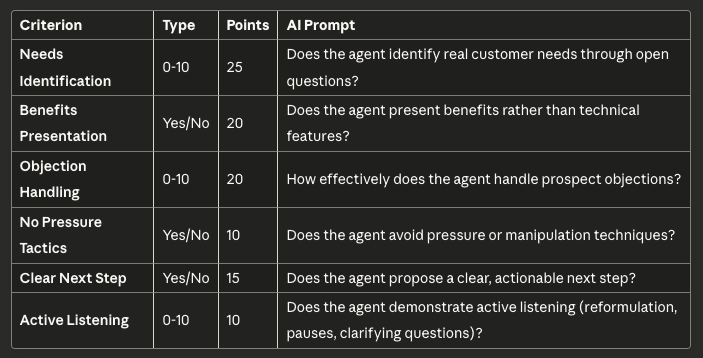
Template #3: Sales Calls
Best for: Inside sales, outbound sales, appointment setting
Total Score: /100 points
Sales Quality vs. Conversion Rate
Many companies mistakenly optimize for conversion rate alone, leading to aggressive tactics that damage long-term customer relationships.
Better Approach: Monitor quality alongside conversion. High-quality sales conversations have:
- ✅ Higher customer lifetime value (CLV)
- ✅ Lower churn rates
- ✅ More referrals
- ✅ Better product-market fit
Red Flags to Watch
- Agents who convert high but generate immediate cancellations
- High-pressure tactics that work short-term but damage brand
- Overselling features customers don't need
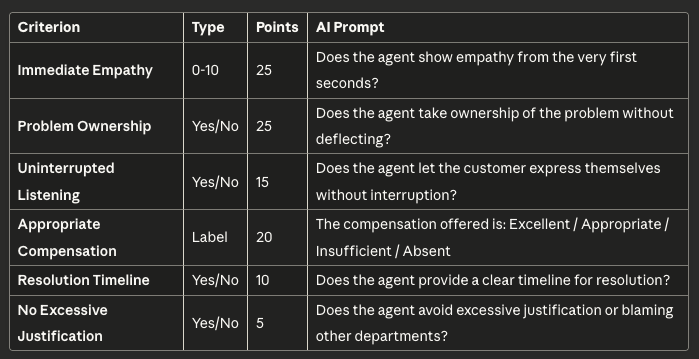
Template #4: Complaint & Dispute Resolution
Best for: Escalations, refund requests, service failures
Total Score: /100 points
The Service Recovery Paradox
Research shows that well-handled complaints create more loyal customers than if no problem had occurred. The key is:
- Speed: Acknowledge within seconds, resolve within hours
- Empathy: Genuine understanding before problem-solving
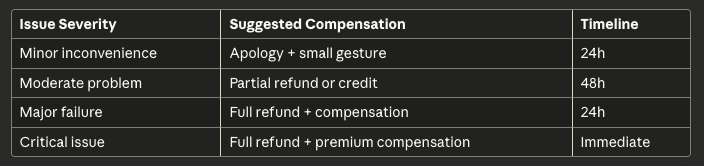
- Compensation: Appropriate to the inconvenience caused
- Follow-up: Ensure satisfaction after resolution
Compensation Guidelines
Template #5: Customer Onboarding
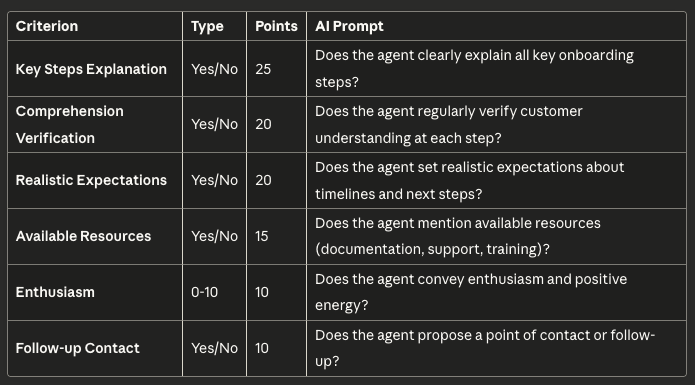
Best for: New customer welcome, product setup, initial training
Total Score: /100 points
Why Onboarding Quality Matters
The first interaction sets the tone for the entire customer relationship. Quality onboarding reduces:
- ⬇️ Early churn: 30-40% lower in first 90 days
- ⬇️ Support tickets: Fewer "how do I..." questions
- ⬇️ Time to value: Customers see ROI faster
Onboarding Success Formula
Great Onboarding = Clear Steps + Realistic Expectations + Enthusiasm + Resources
Anti-pattern: Overwhelming customers with information. Break onboarding into digestible phases.
Template #6: Retention & Churn Prevention
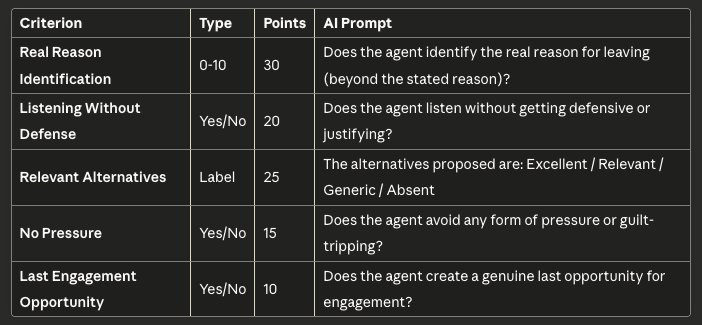
Best for: Cancellation calls, retention specialists, win-back campaigns
Total Score: /100 points
The Psychology of Churn
Most customers don't tell you the real reason they're leaving on the first ask. Effective retention requires:
- Deep listening: Let them vent without interruption
- Reading between the lines: The stated reason is often a symptom
- Personalized solutions: Generic offers rarely work
- Graceful exit: If they must leave, make it positive
Retention Metrics to Track
- Save Rate: % of cancellation calls that result in retention
- Reason Categories: Which issues cause the most churn
- Offer Effectiveness: Which retention offers work best
- Second Churn: Do "saved" customers churn again quickly?
Benchmark: Top-performing retention teams save 25-35% of cancellation requests.
Template #7: Upsell & Cross-sell
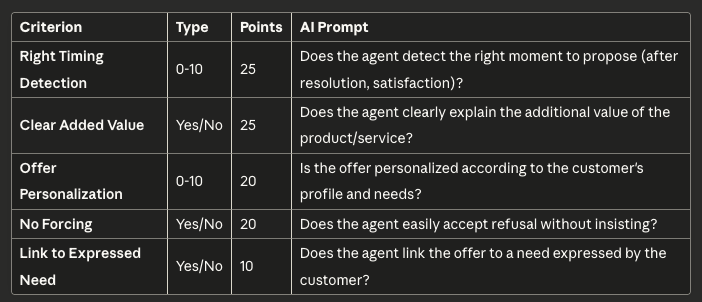
Best for: Account expansion, additional product sales, upgrades
Total Score: /100 points
Upselling Done Right
The difference between value-add upselling and pushy sales:
Good Upsell:
- Happens after solving the customer's problem
- Addresses a real need or pain point
- Respects "no" immediately
- Enhances the customer relationship
Bad Upsell:
- Interrupts problem resolution
- Generic pitch unrelated to context
- Pressures after refusal
- Damages customer trust
Conversion Rate Reality Check
Healthy upsell conversion: 5-15% of opportunitiesIf >20%: Agents may be too aggressiveIf <5%: Offer may not be compelling or timing is off
Template #8: Multilingual Support
Best for: International support teams, multiple language support
Total Score: /100 points
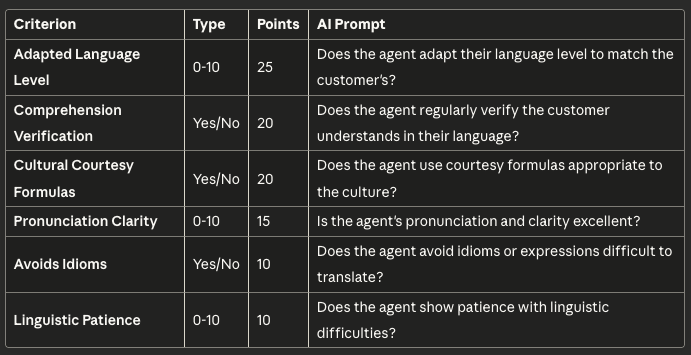
Multilingual Quality Challenges
Supporting customers in multiple languages introduces unique quality considerations:
Language Proficiency ≠ Quality
An agent fluent in a language may still provide poor quality support. Monitor:
- Cultural appropriateness
- Register adaptation (formal vs. informal)
- Clarity for non-native speakers
- Patience with language barriers
Regional Customization
Create variations of this template for different regions:
- Japan/Korea: Higher weight on formality and respect
- Latin America: Higher weight on warmth and personal connection
- Germany/Nordics: Higher weight on directness and efficiency
Template #9: Compliance & Regulated Industries
Best for: Financial services, healthcare, legal, insurance
Total Score: /100 points
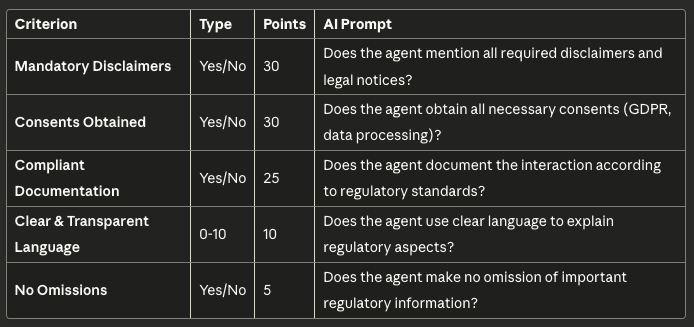
Compliance = Non-Negotiable
In regulated industries, quality monitoring serves dual purposes:
- Customer Experience: Ensure satisfaction
- Legal Protection: Prove regulatory compliance
Failure to monitor compliance can result in:
- ❌ Heavy fines (up to millions)
- ❌ License revocation
- ❌ Legal liability
- ❌ Reputational damage
Audit-Ready Quality Monitoring
Your quality monitoring system should be able to:
- ✅ Produce evidence of 100% compliance checking
- ✅ Track which disclaimers were mentioned when
- ✅ Prove consent was obtained properly
- ✅ Show corrective actions for violations
Template #10: Emergency & Crisis Support
Best for: Medical hotlines, emergency services, crisis management
Total Score: /100 points
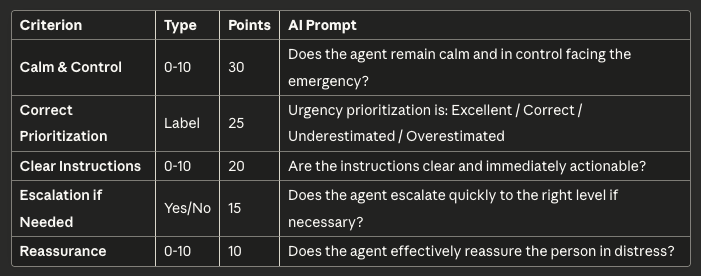
Crisis Communication Principles
Emergency support requires unique skills that differ from standard support:
Speed > Perfection
- In emergencies, fast action beats perfect information
- Triage correctly, escalate immediately when needed
- Document after, not during
Calm Contagion
- Agent's calm demeanor transfers to caller
- Controlled tone and clear speech patterns
- Reassurance through confident competence
Training Requirements
Agents handling emergency calls need:
- 🎓 Crisis communication training: 40+ hours
- 🎓 Psychological first aid: Understanding trauma responses
- 🎓 Escalation protocols: When and how to escalate
- 🎓 Regular drills: Practice high-pressure scenarios
How to Implement These Templates
Step 1: Choose Your Template
Select the template that best matches your primary support scenario. You can always customize or combine templates later.
Step 2: Customize Criteria
Adjust the criteria to match your brand values and business goals:
- Add industry-specific requirements
- Adjust point weights based on priorities
- Modify AI prompts to match your terminology
Step 3: Set Up Automated Monitoring
With AI-powered quality monitoring platforms like Gravite:
- Import your template
- Connect your communication channels (calls, emails, chat)
- Let AI evaluate 100% of interactions automatically
- Review dashboards and insights
Step 4: Train Your Team
Share the quality criteria with agents:
- ✅ Explain why each criterion matters
- ✅ Provide examples of excellent vs. poor performance
- ✅ Set realistic improvement goals
- ✅ Celebrate progress publicly
Step 5: Iterate & Improve
Quality templates should evolve:
- Review criteria quarterly
- Remove criteria that don't correlate with satisfaction
- Add new criteria as priorities shift
- Adjust weights based on business impact
Measuring Template Effectiveness
Key Metrics to Track
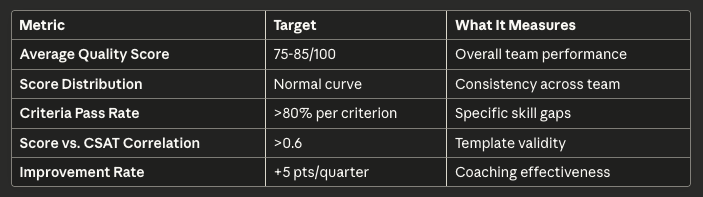
Template Validation
A good quality template should:✅ Predict satisfaction: High scores correlate with high CSAT/NPS✅ Differentiate performance: Clear separation between top and bottom performers✅ Guide improvement: Agents know exactly what to improve✅ Be reliable: Different evaluators reach similar scores
Red Flag: If quality scores don't correlate with customer satisfaction, your criteria may be wrong.
Common Quality Monitoring Mistakes
❌ Mistake #1: Too Many Criteria
Problem: Templates with 15-20 criteria overwhelm agents and dilute focus.
Solution: Start with 5-6 most impactful criteria. Add more only when mastered.
❌ Mistake #2: All Criteria Weighted Equally
Problem: Not all quality aspects have equal impact on satisfaction.
Solution: Weight criteria by business impact. Critical elements should be worth more points.
❌ Mistake #3: Sampling Only
Problem: Evaluating 2-3% of interactions leaves 98% unmonitored.
Solution: Use AI to analyze 100% of interactions, not just samples.
❌ Mistake #4: Delayed Feedback
Problem: Coaching agents weeks after interactions is ineffective.
Solution: Automated real-time quality monitoring enables immediate feedback.
❌ Mistake #5: Quality Without Action
Problem: Measuring quality but not acting on insights wastes resources.
Solution: Link quality monitoring to coaching programs, training, and performance management.
Advanced: Combining Templates
Many support teams handle multiple scenarios. You can:
Option A: Master Template
Create one comprehensive template covering all scenarios but risk dilution.
Option B: Multiple Templates
Use different templates for different interaction types:
- General inquiries → Template #1
- Technical issues → Template #2
- Complaints → Template #4
- Cancellation calls → Template #6
Recommended: Start with Option B for clearer focus and more actionable feedback.
Dynamic Template Selection
Advanced AI quality monitoring can automatically:
- Detect interaction type (sales, support, complaint)
- Apply the appropriate quality template
- Score using relevant criteria only
Quality Monitoring ROI
Typical Results from Template Implementation
Companies implementing standardized quality templates with AI monitoring see:
Operational Metrics:
- ⬆️ +15-25% CSAT improvement in 6 months
- ⬆️ +20-30% First Contact Resolution
- ⬇️ -30-40% agent turnover
- ⬇️ -50% QA manager time on manual reviews
Financial Impact:
- 💰 ROI of 8-12x in first year
- 💰 $500-1000 saved per agent annually in reduced turnover
- 💰 15-20% reduction in escalations
Time to Value
- Week 1: Template configured and AI monitoring live
- Week 2-4: Initial insights and coaching opportunities identified
- Month 2-3: First measurable improvements in scores
- Month 4-6: Significant CSAT and operational improvements
Frequently Asked Questions
How many interactions should I evaluate?
Answer: All of them. With AI-powered quality monitoring, evaluating 100% of interactions costs the same as 2% sampling but provides complete visibility.
Can I use the same template for calls, emails, and chat?
Answer: Yes, but consider adding channel-specific criteria:
- Calls: Tone, active listening, hold management
- Emails: Grammar, structure, response time
-
- Chat: Response speed, multi-tasking, emoji usage
How often should I update templates?
Answer: Review quarterly, update when:
- Business priorities change
- New products/services launch
- Criteria don't correlate with satisfaction
- Industry regulations change
Should agents know the quality criteria?
Answer: Absolutely! Transparency improves performance:
- ✅ Share all criteria and prompts
- ✅ Provide training on each element
- ✅ Show real examples of excellent performance
- ✅ Make quality scores visible to agents
What's a good quality score?
Answer: Depends on your template, but generally:
- 85-100: Excellent (top 20% of agents)
- 70-84: Good (meets standards)
- 60-69: Needs improvement
- <60: Requires immediate coaching
How do I handle disagreements about scores?
Answer: With AI monitoring:
- Scores are objective and consistent
- Provide transcripts for transparency
- Create appeals process for edge cases
- Use calibration sessions to align understanding
Conclusion: Start Monitoring Quality Today
Quality monitoring doesn't have to be complicated. With these 10 ready-to-use templates, you can start measuring and improving customer service quality immediately.
Key Takeaways:
✅ Choose the template that matches your support scenario✅ Customize criteria to your brand and business goals✅ Use AI to monitor 100% of interactions, not just samples✅ Link quality monitoring to coaching and improvement programs✅ Measure effectiveness and iterate continuously
The companies winning in customer experience don't guess—they measure, analyze, and improve systematically.
Ready to implement quality monitoring with these templates?
Get Started with AI Quality Monitoring
Gravite makes it easy to implement these templates and monitor 100% of your customer interactions automatically.
What you get:
- ✅ All 10 templates ready to use
- ✅ AI that analyzes every call, email, and chat
- ✅ Real-time dashboards showing performance
- ✅ Automated coaching insights
- ✅ CSAT prediction included